Powerful Features for Busy Sports Parents

Import schedules from any source, manage multiple teams, and keep your entire family organized with a unified calendar built specifically for sports parents.

Get Started Today

Import Schedules from Anywhere

No matter where your team publishes schedules, Schedule Caddie can import them.

Calendar Feed URLs

Import schedules from ICS/iCal/webcal feed URLs. Works with TeamSnap, SportsEngine, LeagueApps, GameChanger, Spond, TeamLinkt, Heja, Jersey Watch, and any platform that provides calendar feeds.

  • Paste the feed URL and we handle the rest
  • Daily refresh + on-demand refresh (with approval)
  • AI detects team names automatically
  • Supports all major team management platforms

Smart Parsing

Our system analyzes your calendar feed and automatically categorizes events, identifies team names, and extracts event details.

  • Detects team names from event patterns
  • Categorizes as Game, Practice, Tournament, etc.
  • Extracts locations, opponents, and notes
  • You review and approve before events are added

Smart Team Mapping

Create your teams, import your feeds, and AI connects them together. Confirm once, and the system remembers forever.

How It Works

  1. 1

    Create Your Teams

    Set up teams for each of your children's activities with custom colors and details

  2. 2

    AI Detects & Maps Feed to Team

    When you import a calendar feed, AI analyzes event patterns and suggests which team it belongs to. You confirm the connection.

  3. 3

    System Remembers Forever

    All future feed refreshes automatically update the correct team. No re-mapping. No re-work.

Why This Matters

  • Faster Refreshes After Setup

    Once a feed is mapped to teams, future refreshes don't need re-detection—updates apply automatically

  • Privacy-First

    We don't sell your data. Sharing links are view-only, and you can revoke access anytime.

  • Set It and Forget It

    Map your teams once during initial import, then never think about it again

AI Schedule Analysis

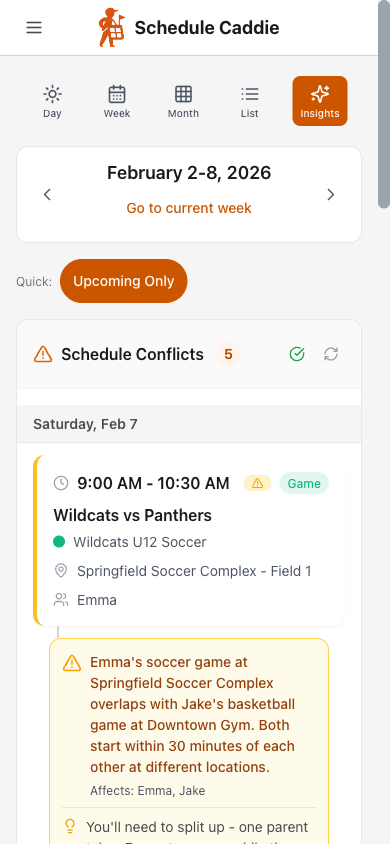
Our AI scans your entire family schedule and spots problems before they become emergencies. Know what's coming so you can plan ahead.

schedulecaddie.com
AI Schedule Analysis showing detected conflicts and recommendations - Desktop view

Overlapping Events

Instantly identify when two events are scheduled at the same time. No more double-booking or realizing at the last minute that both kids have games simultaneously.

  • Detects direct time conflicts
  • Shows which events overlap
  • Critical severity for can't-miss conflicts

Travel Time Crunches

Back-to-back events at different locations? The AI flags when you might not have enough time to get from one place to another.

  • Analyzes event locations
  • Considers time between events
  • Warning severity for tight transitions

Busy Day Alerts

Some days are just going to be chaotic. The AI identifies days with multiple events so you can plan ahead and prepare for the madness.

  • Counts events per day
  • Highlights high-activity weekends
  • Info severity for awareness

How AI Analysis Works

  1. 1

    Import Your Schedules

    Add calendar feeds from all your kids' teams and activities

  2. 2

    Run AI Analysis

    Click "Analyze Schedule" and our AI examines your entire calendar

  3. 3

    Review Insights

    See conflicts organized by severity with clear explanations

  4. 4

    Plan Ahead

    Use the insights to coordinate carpools, adjust plans, or prepare for busy days

Severity Levels

CriticalEvents overlap - action needed
WarningTight timing or potential issue
InfoGood to know, no action required

Powerful Team Management

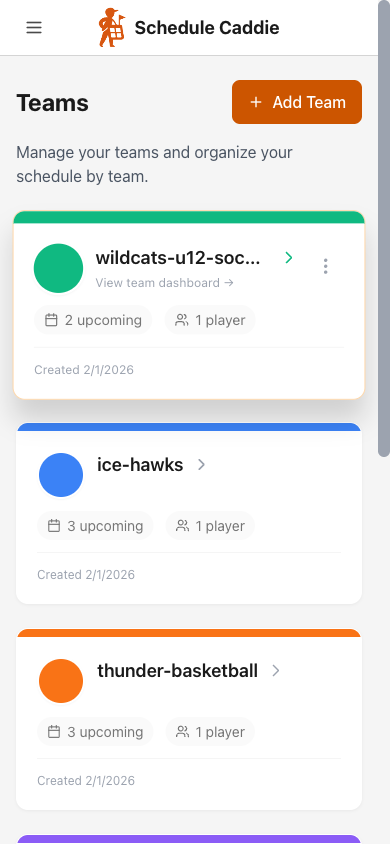
Organize teams for each child and activity with custom colors and details.

schedulecaddie.com
Teams page showing multiple sports teams with color coding - Desktop view

Custom Colors

Choose from 8 color presets or use the custom color picker. Each team gets a unique color in your calendar.

Team-Specific Views

View calendars for individual teams or combine multiple teams in one unified view.

Team Overview

See upcoming events and team details all in one organized place.

Unified Calendar View

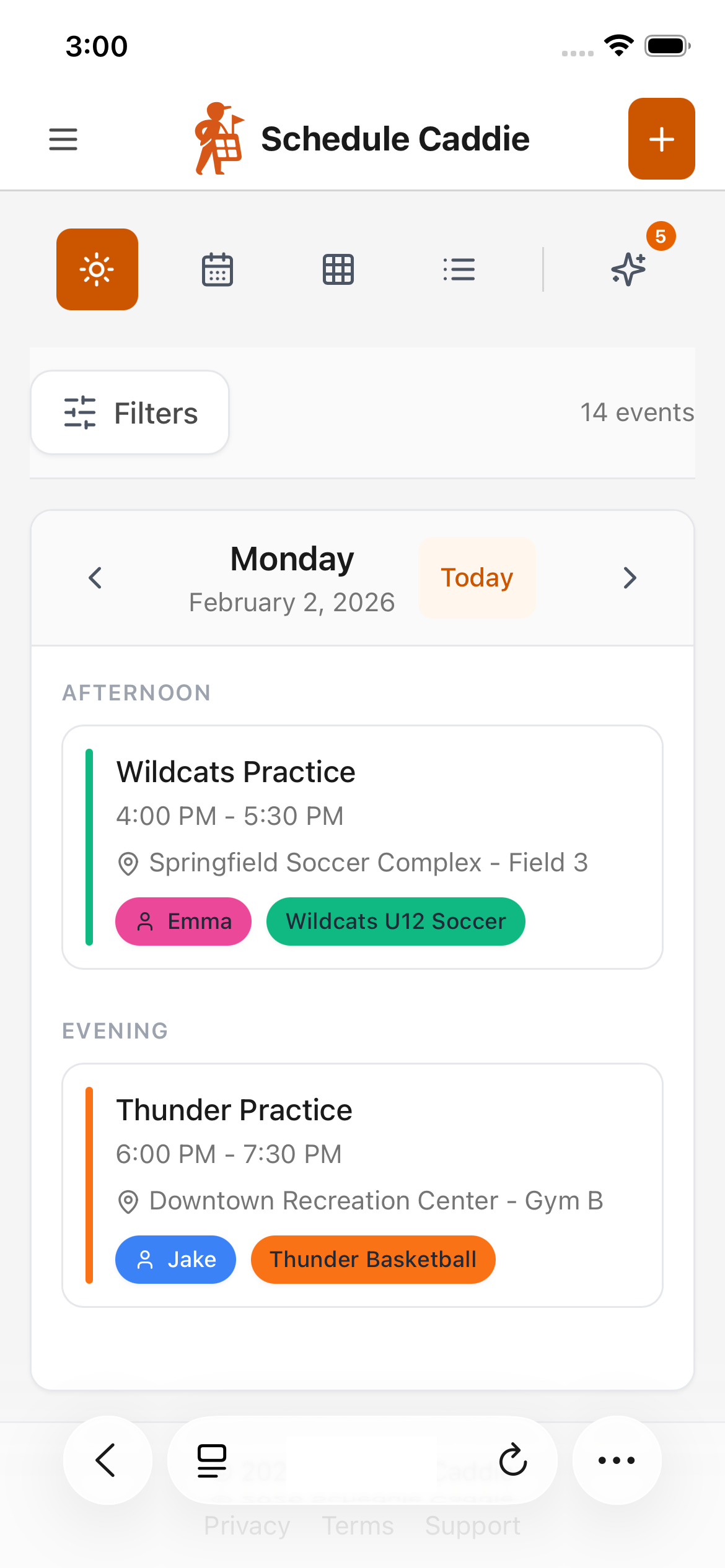
See all your teams' schedules in one beautiful, color-coded calendar.

schedulecaddie.com
Unified calendar showing events from multiple teams with color coding - Desktop view

Month view shows all your events at a glance

Multiple Views

  • Month View: See the big picture of your month at a glance
  • Week View: Focus on the upcoming week with detailed times
  • Agenda/Timeline: See events in chronological list format

Color-Coded Events

  • Each team displays in its custom color
  • Priority indicators show important events
  • Event type icons (game, practice, tournament)

Event Details

  • Click any event to see full details
  • Location, opponent, notes, and more
  • Quick access to directions and event info

Advanced Filtering

Focus on what matters with powerful filters and search capabilities.

Filter Options

Filter by Team

Show or hide specific teams to focus on what's relevant right now

Filter by Priority

Only show high-priority events when you need to focus on the most important activities

Filter by Event Type

View only games, only practices, or only tournaments - your choice

Search Everything

Powerful search across all your events. Find games by opponent, practices by location, or any event by keyword.

Example searches:

  • Springfield — find all games vs Springfield
  • tournament — show all tournaments
  • Field 5 — events at a specific location

Customizable Priority System

Mark important events and filter your calendar by priority level.

Priorities

1

Must Attend

Critical events that cannot be missed

Default
3

Important Game

Playoffs, championships, etc.

5

Regular Practice

Weekly scheduled practices

10

Optional

Flexible events that can be skipped if necessary

Default

Create Your Own System

You start with two priorities and can add more to match how your family thinks about schedules.

  • Create priorities with any name and color
  • Rank from 1-10 to control sort order
  • Assign priorities to individual events or entire teams
  • Color-coded priority indicators in calendar view

Feed Sync & Change Approval

Keep schedules up-to-date automatically with smart change detection and approval workflow.

Sync cadence: Daily automatic refresh + on-demand manual refresh. You approve changes before they appear.

Automatic Refresh

Feed subscriptions automatically refresh daily to catch schedule changes from your team's source.

  • Daily automatic refresh for all feeds
  • Manual refresh on-demand anytime
  • Status indicator shows last refresh time

Change Detection

System intelligently detects what's new, what changed, and what was removed from your team's schedule.

  • Detects new events added to schedule
  • Identifies modified times, locations, opponents
  • Tracks removed/cancelled events

Approval Workflow

Review all changes before they update your calendar. You stay in control of what appears on your schedule.

  • Review changes before accepting
  • See exactly what changed with diff view
  • Approve all or reject specific changes

Full Sync History

Every feed refresh is logged with complete history. See when schedules were updated, what changed, and when you approved changes.

  • Complete audit trail of all schedule changes
  • Review past changes and approvals
  • Track when schedules were last synced

Calendar Sharing

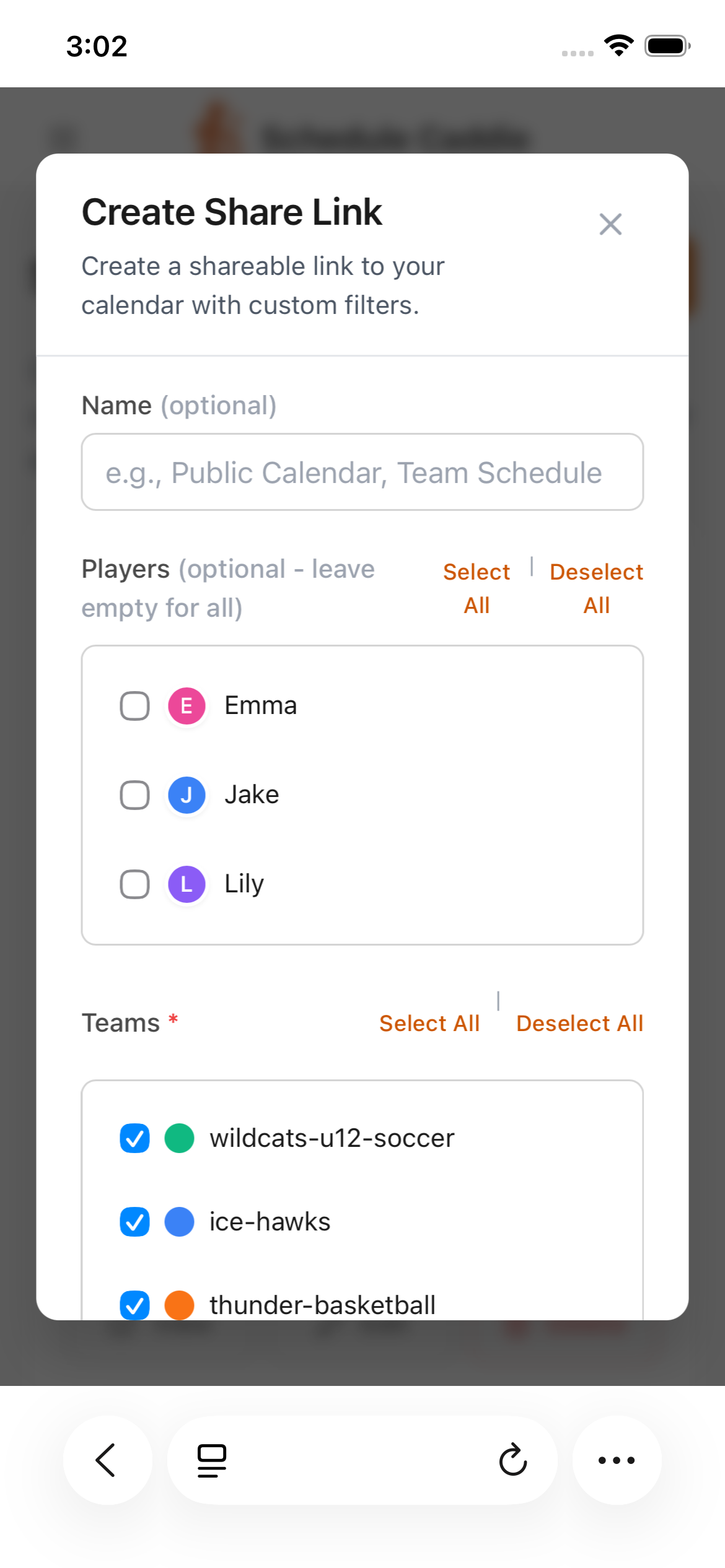
Share calendars with family, coaches, or carpool partners with granular control over what's visible.

How Sharing Works

  1. 1

    Create a Share Link

    Generate a unique share link (unlisted) for your calendar

  2. 2

    Choose What to Share

    Filter by specific teams, event types, or priority levels

  3. 3

    Share the Link

    Recipients view a read-only calendar without needing to log in

Anyone with the link can view. It's not listed or indexed. You can revoke access anytime.

Sharing Controls

  • Filter by Team

    Share only specific teams. Perfect for sharing with coaches or individual carpool groups.

  • Filter by Event Type

    Share only games, only practices, or any combination you choose.

  • Filter by Priority

    Share only high-priority events to avoid overwhelming recipients.

Share with Family

Give grandparents or extended family view-only access to schedules

Share with Carpool

Share one team's schedule with your carpool partners

Share with Coaches

Give coaches view-only access to the schedule you choose (games only, one team, high-priority events, etc.)

Ready to Get Organized?

Get started for free and experience all these features today.